Summarize with:
read in < 1 min


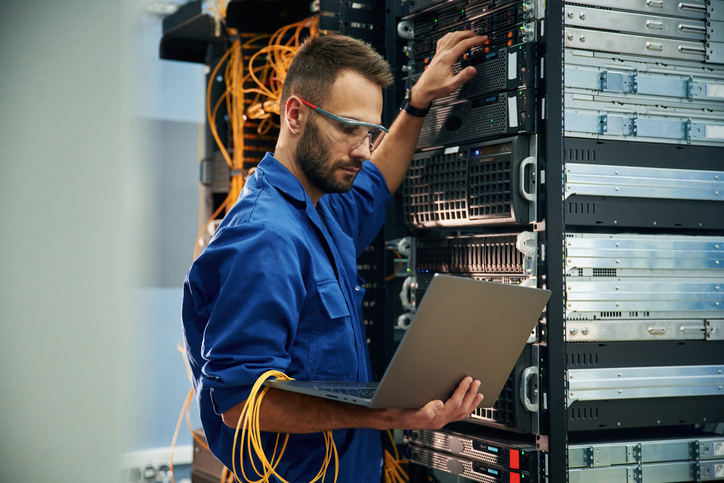
Networking is core to modern data center operations. In fact, high-quality network connectivity can be a huge selling point for data center operators. It is, however, vital that network infrastructure is compatible with the network equipment it is intended to support. Here is a quick guide to what you need to know.
There are many reasons why networking compatibility is important to data centers. Here are three of the main ones.
When networking equipment is compatible, it can communicate effectively with other devices, such as servers, storage systems, and applications. Incompatible hardware or software may result in communication errors, packet loss, or network congestion, leading to degraded performance and potential downtime.
In a data center environment, various devices from different vendors must work together seamlessly to form a cohesive network architecture. Interoperability enables devices to exchange data and signals without encountering compatibility issues, facilitating tasks such as traffic routing, load balancing, and security enforcement.
Ensuring compatibility helps organizations avoid unnecessary expenses associated with equipment replacement, retrofitting, or troubleshooting.
Compatible networking hardware and software can be seamlessly integrated into existing infrastructure, minimizing deployment complexities and reducing the need for costly customization or workarounds.
Additionally, compatibility simplifies the process of scaling up or expanding the data center network, as new equipment can be added without disrupting ongoing operations.
Data center networks are complex systems of hardware and software that interconnect all the computing resources within a data center. Here is a brief overview of the main hardware components.
Cabling: This provides the physical pathways through which data travels. In modern data centers, fiber optic cables are considered essential for high-speed data transmission over long distances. Copper cables are, however, still considered useful for shorter connections within data centers.
Routers: These connect the data center to external networks, such as the internet, and manage traffic between different data center segments. They are essential for directing data packets between different networks, determining the optimal path for data transfer, and ensuring efficient and accurate delivery of information across the network.
Switches: These operate within the local network, connecting various devices like servers and storage systems within the data center. They manage data traffic at the packet level, ensuring that data is forwarded to the correct destination.
Load balancers: These distribute network or application traffic across multiple servers, ensuring no single server becomes overwhelmed with too much traffic. This not only improves performance and reliability by optimizing resource use but also enhances redundancy and fault tolerance.
The key to ensuring networking compatibility is robust network management. Here are five key best practices all data center managers should implement to keep their networking infrastructure in the best possible order.
Following established industry standards, such as those set by IEEE (Institute of Electrical and Electronics Engineers) and IETF (Internet Engineering Task Force), ensures that networking equipment from different manufacturers can work together effectively.
This helps to ensure a more cohesive network environment and, hence, minimizes the risk of compatibility issues.
Backward-compatible devices can operate with older hardware, allowing organizations to integrate new technologies without immediately replacing all existing equipment. This approach not only preserves investment in legacy systems but also provides a phased upgrade path.
Making continuous gradual improvements in network performance and capabilities helps to minimize the disruption to users.
This involves setting up a controlled environment that mimics the production network to evaluate how new devices interact with existing hardware and software.
Testing should cover various scenarios, including peak load conditions and failure simulations, to ensure that the equipment performs reliably under all circumstances.
Comprehensive testing helps identify potential compatibility issues early, reducing the risk of network disruptions during deployment.
Keeping networking equipment’s firmware and software up to date is vital for compatibility and security. Manufacturers frequently release updates that address bugs, enhance performance, and improve interoperability with other devices.
Regularly updating firmware and software ensures that networking equipment can support new protocols and standards, maintain compatibility with other devices, and protect against vulnerabilities.
Establishing a routine update schedule and monitoring for new releases can significantly enhance network stability and compatibility.
Establishing strong relationships with networking equipment vendors is essential. By working closely with vendors, organizations can ensure that new equipment is compatible with existing infrastructure. Vendors can provide insights into their products’ interoperability with other devices and offer customized solutions that fit specific network requirements.
This collaboration often includes access to vendor support and compatibility testing services, which can preemptively address potential issues and facilitate smoother integration of new technologies.

Sign Up For Our Resource Library
Enjoying our resource? Get the latest news and articles delivered straight to your inbox.
Can’t see the form? Click here.
Share Article
Popular Categories
A Cross Connect Access Point (CCAP) is a network device that serves as a hub for connecting multiple cable modems and other customer premises equipment (CPE) to a cable network. CCAPs are a critical component of modern cable networks, enabling cable operators to deliver high-speed internet, voice, and video services to customers.

Gain insight into the importance of comprehensive network monitoring in colocation. Find out what makes colocation networks different from networks in on-premises data centers. Learn the basics of network monitoring in colocation and find out how advanced network monitoring tools improve on it.

Explore the partnership between the internet of things (IoT) and colocation. Gain an overview of both the IoT and colocation. Find out what steps colocation providers have taken to adapt their services to support the IoT. Learn three key practicalities of implementing the IoT through colocation.
Discover the DataBank Difference today:
Hybrid infrastructure solutions with boundless edge reach and a human touch.
Tell us about your infrastructure requirements and how to reach you, and one of team members will be in touch shortly.
Can’t see the form? Click here.
Let us know which data center you'd like to visit and how to reach you, and one of team members will be in touch shortly.
Can’t see the form? Click here.
Enjoying our resource? Get the latest news and articles delivered straight to your inbox.
Can’t see the form? Click here.
Can’t see the form? Click here.